





Power Bank Low-Current Mode: How OEM Buyers Test Earbuds, Wearables and Auto-Shutoff
A power bank may charge a phone without trouble and still shut off halfway through charging an earbud case. As the case fills, its current draw can fall low enough for the power bank to mistake it for an unplugged cable. OEM buyers should test the actual accessory and cable for the whole charging session. The approval record needs to show when output starts, whether it stays on as current falls, and what happens after the accessory is full or removed.
This is easy to miss during sample review. The case lights up, the power bank display shows output, and everyone moves on. Twenty minutes later, the case may have stopped charging. A time-stamped output log tells a different story from a photo taken at the start.
Why can a power bank stop charging earbuds?
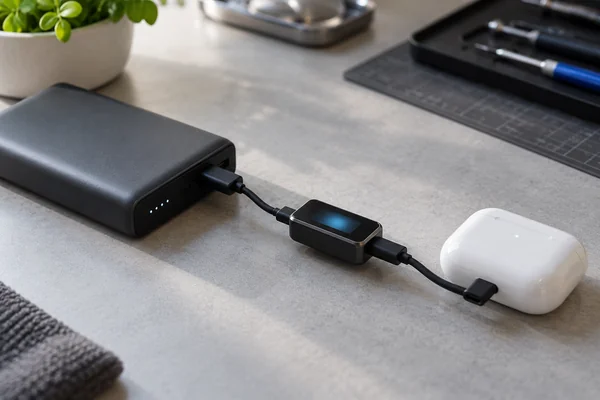
Many power banks shut down their USB output when they detect little or no load. That prevents an unused port from draining the battery. An earbud case or watch charger can draw very little current, especially near the end of a charge. Whether that triggers shutdown depends on the power bank’s detection settings and the accessory’s changing demand.
Belkin documents the problem for one of its power banks. Its Low Current Mode keeps output available for small accessories and exits after two hours. Those are Belkin’s instructions for that model. They do not establish the button sequence, operating time or threshold of a YULIDA product.
USB-IF notes that USB Power Delivery can serve low-power devices, including headsets. PD support alone, however, does not tell a buyer how a particular power bank detects an idle load or when its output turns off. Those behaviors need a model-specific test.
First, get a clear description of the mode
The supplier’s specification should say which ports support small accessories, whether output starts automatically, and whether the user must select a separate mode. It should also explain the indicator and the condition that ends the mode. A product family may contain different firmware or port arrangements, so the description must identify the ordered SKU and revision.
Separate the test into three events:
| Event | What to check | Evidence |
|---|---|---|
| Start | Does connecting the accessory wake the output, or is a button press needed? | Connection sequence and output-voltage trace |
| Continue | Does output stay available as the accessory’s current rises and falls? | Timed voltage/current log and accessory charging result |
| Stop | When does output turn off after the accessory is full or disconnected? | Shut-off time, indicator state and idle measurement |
“Low-current mode” often describes a way to keep the output awake. It should not be read as a promise that the power bank forces a fixed current into the accessory; the accessory’s charging circuit controls its demand. If the factory calls the feature “trickle charging,” ask for the operating instructions rather than relying on the name.
Follow a real accessory through its charge
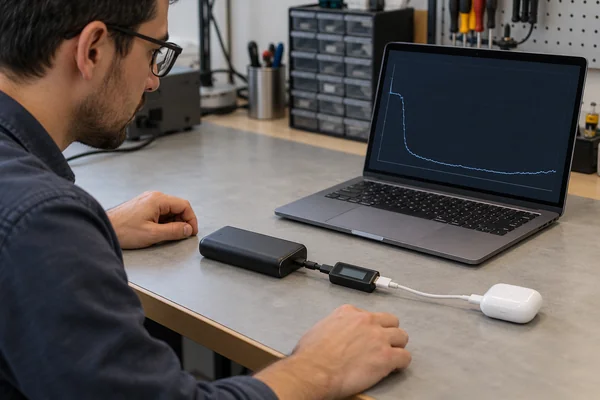
Test the earbuds, watch or tracker named in the intended product claim. Keep a record of the accessory model, its starting charge level, the cable or charging puck, and the power-bank port. Run one session from a low charge level and another from a partly charged state. The second can expose a shutdown that an empty-case test misses: the accessory may draw enough current at first, then taper below the power bank’s detection threshold.
Measure USB output voltage and current over time. The meter must resolve small loads, and its presence must not change the behavior being tested. Note the accessory’s charging indication alongside the electrical log. A programmable load is useful for finding where output starts or stops, but it cannot imitate every current pulse from a real charging case.
Keep the test running for the promised use, not an arbitrary five-minute demonstration. If the listing will say the product charges a particular watch, the sample should remain connected through the agreed charging period. Put that period and the acceptable outcome in the product specification before the test begins. Belkin’s two-hour timer is not a pass criterion for other models.
The moments worth watching
Connect the accessory while the power bank is asleep. If it does not wake, follow the proposed user instructions exactly and record each button press. Later, watch the current as the accessory fills. Does output disappear before charging is complete?
Then unplug and reconnect the accessory. Try the same sequence with a phone on a second port, if simultaneous use is part of the product claim. Finally, repeat at a defined lower power-bank charge state. These changes can expose a mode that looked stable during a single-port bench test.
Test built-in cables, USB-A, USB-C and wireless outputs only where the product claims to support them. A passing result on one connection does not cover the others.
Check shutdown without confusing it with standby drain
Two outcomes matter here. The output should remain available long enough to charge the small device, then shut down as specified when there is no useful load. Keeping it awake for too long consumes stored energy; shutting it off too soon leaves the accessory unfinished.
After unplugging the accessory, measure how long the USB output stays on. Repeat with a fully charged accessory still connected. If the mode uses a timer, check what happens when it expires in both situations, and whether a reconnect or button press restores output.
Idle drain needs its own measurement. A USB meter cannot show all current consumed by the power bank’s internal electronics after USB output has switched off. Use a method suited to the battery and control circuit, and state the measurement point and duration in the report. YULIDA’s quality-testing guide lists auto-shutoff, low-current operation and self-discharge separately. The OEM test record should do the same.
What belongs in the OEM acceptance record?
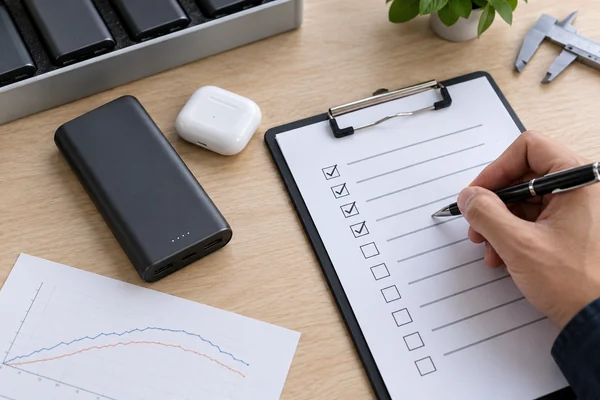
The following fields make a supplier result repeatable. Agree on the pass/fail limits for the selected product; no generic threshold can stand in for its specification.
| Field | Record |
|---|---|
| Product | Buyer SKU, factory model, capacity variant, PCBA and firmware revision, sample or lot ID |
| Accessory | Exact earbud or wearable model, cable or charging puck, starting charge state |
| Connection | Output port or built-in cable; any second device used during the test |
| Start | Automatic wake-up or required user action, with permitted start delay |
| Charging session | Required duration, output continuity and final accessory result |
| End of session | Behavior after full charge, disconnection or timer expiry |
| Idle state | Measurement method, point, duration and agreed drain limit |
| Decision | Time-series files, unusual events, measured result and approver |
Save the original logs with the sample identity. A new controller, firmware build or cable assembly may change low-load detection while leaving the housing untouched. The buyer should decide whether the change needs a fresh test and which production lots it affects. YULIDA’s BOM and change-control guide covers that handoff from approved sample to production.
Write a claim that matches what passed
“Charges earbuds” can mislead when the test covered one case, one cable and a mode the user has to activate manually. The listing and manual should identify the supported connection, how to turn the mode on, how its indicator works and when it exits. If compatibility is limited to tested accessories, say so. Do not copy another brand’s timer or button sequence into this product’s instructions.
Keep the claim consistent across the online listing, box and manual. The product-specification guide is a place to define the mode and its acceptance criteria; the label and manual checklist helps align the customer-facing wording.
Frequently asked questions
1. Do earbuds always need a special low-current mode?
No. Some power banks keep output on for the intended accessory in normal operation. Others require a separate mode. Check the actual combination of power bank, port, cable and accessory.
2. Does the mode make a wearable charge more slowly?
Not necessarily. Its purpose may simply be to prevent premature output shutdown. The accessory determines its own charging demand, so any charging-speed claim needs a separate test.
3. Can a charging icon prove compatibility?
It proves very little beyond that moment. The output may shut off as the accessory’s current falls. Compare the timed electrical log with the accessory’s final charge result.
4. Is a two-hour shut-off timer standard?
No. It is documented for some products, including the Belkin example above, but it is not a universal rule. The ordered SKU needs its own stated timer and test result.
5. What should a buyer ask the factory to send?
Ask for the operating instructions, supported-port list, agreed test limits and timed results from the accessories named in the claim. The report should identify the sample’s hardware and firmware revision so a later production check can be compared with it.
Before approving the order
Give YULIDA the small devices customers are expected to charge and the ports they will use. Decide whether a button-operated mode is acceptable for the product. Once the sample passes a documented full-session test, the same behavior can be written into the order specification and customer instructions. Until then, “supports earbuds” is an unverified claim.
Official sources and verification
These primary sources support standards, compatibility, safety, or transport statements discussed in this article. Confirm the current requirement for the exact product model and destination market.
- USB Implementers Forum — USB Type-C and USB Power Delivery specifications and guidance.
