






What Is the Best Wireless Power Bank for iPhone? (2026 Buyer’s Guide)
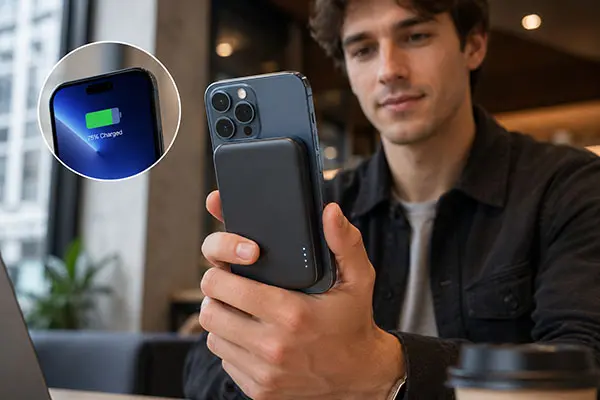
For most iPhone users, a Qi2-certified 10,000mAh magnetic power bank with verified wireless output offers a practical balance of capacity, portability, and charging convenience. Buyers considering a newer Qi2.2 model should confirm that both the phone and accessory support the claimed charging profile. The key is matching the charging standard to the specific iPhone model rather than choosing by the highest mAh number alone.
Manufacturers use magnets that snap onto your iPhone but skip the certification and coil tuning needed for full-speed charging. You pay for “MagSafe” performance and get budget-Qi speeds.
If you’ve ever stood in an electronics aisle or scrolled through Amazon listings feeling overwhelmed by spec sheets, you’re not alone. The terminology — MagSafe, Qi2, Qi2.2, “MagSafe compatible” — creates a fog that makes confident buying nearly impossible. This guide cuts through the fog — standards, a 5-factor framework, use-case picks, and insider knowledge from the manufacturing floor that most buyer’s guides skip.
Key Takeaways
– A Qi2-certified 10,000mAh magnetic power bank is the sweet spot for most iPhone 12–15 users, delivering 15W wireless charging and roughly 1.5 full charges.
– iPhone 16/17 owners should prioritize Qi2.2-certified 25W models — only 64 power banks had earned this certification by late 2025.
– “MagSafe compatible” on the box usually means 7.5W, not 15W. Look for official Qi2 or Qi2.2 certification on the WPC database to confirm real speeds.
– Wireless charging loses 35–45% of stored energy to heat and voltage conversion, so a 10,000mAh bank delivers about 6,000–7,000mAh of usable power.
– All power banks up to 26,800mAh fall within the 100Wh airline carry-on limit — no special approval needed.
The Best Wireless Power Bank for iPhone
The best wireless power bank depends on your iPhone model and lifestyle. For daily commuting and general use, a Qi2-certified 10,000mAh magnetic power bank at 15W is the most versatile choice. For iPhone 16 or 17 owners who want maximum speed, a Qi2.2-certified 25W model is worth the premium. For travelers, a 20,000mAh model provides multiple full charges without exceeding airline limits. Skip any product labeled only “MagSafe compatible” without Qi2 or Qi2.2 certification — it almost certainly caps at 7.5W.
| iPhone Model | Best Speed | Recommended Certification | Recommended Capacity |
|---|---|---|---|
| iPhone 16 / 17 | 25W (Qi2.2) | Qi2.2 Certified | 10,000mAh |
| iPhone 12–15 | 15W (Qi2) | Qi2 Certified | 5,000–10,000mAh |
| iPhone 11 & earlier | Not magnetic | Qi wireless or wired | 10,000mAh+ (wired) |
Want to see how these recommendations fit into a broader product lineup? Explore YULIDA’s magnetic wireless power bank collection →
Understanding Wireless Charging Standards: MagSafe vs Qi2 vs Qi2.2
Since Apple launched MagSafe in 2020, wireless charging for iPhone has split into three speed tiers — and most buyers don’t realize they’re in different leagues. Get the standard wrong and you’ll pay MagSafe prices for budget-Qi speeds.
MagSafe — Apple’s Proprietary 15W Standard
MagSafe debuted with the iPhone 12 in 2020 as Apple’s magnetic charging system. It uses a ring of magnets to align the charging coil precisely with the iPhone’s receiving coil, enabling 15W wireless charging — double the 7.5W that older Qi chargers delivered to iPhones. True MagSafe requires Apple’s proprietary authentication chip, which is why only Apple-branded and Apple-licensed accessories (from brands like Belkin and Anker) carry the official “MagSafe” label.
The catch? Apple’s licensing fees make genuine MagSafe accessories expensive, and the standard hasn’t evolved beyond 15W for third-party power banks. That’s where Qi2 enters the picture.
Qi2 — The Open Standard That Matches MagSafe
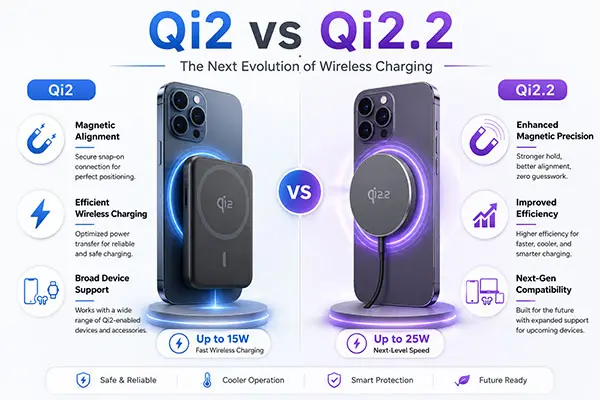
Qi2 launched in 2023 as the Wireless Power Consortium’s (WPC) answer to MagSafe. It uses the same Magnetic Power Profile (MPP) technology — magnets for alignment plus 15W wireless output — but without Apple’s licensing restrictions. Any manufacturer can certify a Qi2 product through the WPC, which has driven rapid adoption.
By September 2025, over 515 power banks had earned Qi2 certification from 264 brands. For iPhone 12 through 15 models, a Qi2-certified power bank delivers identical 15W charging speed to genuine MagSafe at a lower price. If you own an iPhone 12, 13, 14, or 15, Qi2 is the standard you want.
Qi2.2 — The New 25W Speed Tier (iPhone 16/17 Only)
Qi2.2 is the latest evolution, raising the wireless charging ceiling to 25W — a 67% speed increase over Qi2’s 15W. Apple added Qi2.2 support to the iPhone 16 series via the iOS 26 update in September 2025, and the iPhone 17 series supports it natively. With a Qi2.2-certified power bank, an iPhone 16 or 17 can charge from 0% to roughly 50% in about 30 minutes.
But Qi2.2 adoption is still in its early stages. As of late 2025, only 64 power banks had passed Qi2.2 certification — a fraction of the Qi2 ecosystem. The standard also includes stricter thermal requirements: at 25W output, the power bank’s surface temperature must stay at or below 40°C to protect both the device and the user’s hands.
The 7.5W Trap: Why “MagSafe Compatible” ≠ Real MagSafe
This is where most buyers lose money. The phrase “MagSafe compatible” on a product listing sounds reassuring — it implies the power bank works with your iPhone’s MagSafe system. In reality, it usually means the bank has magnets that physically attach to your iPhone but uses a basic Qi charging coil limited to 7.5W.
From a manufacturing perspective, this is straightforward economics. A true Qi2-certified magnetic power bank requires a certified transmitter coil, an MPP-compatible chipset, and WPC testing fees. A “MagSafe compatible” product skips all of that — it uses generic magnets and a standard Qi coil, cutting costs by 40-60%. The magnets work. The charging speed doesn’t.
Sarah, a marketing inquirynt in Chicago, learned this the hard way. She bought a “MagSafe compatible” 10,000mAh power bank from Amazon for $29 to keep her iPhone 14 Pro alive during client meetings. It snapped on perfectly and looked the part. But after three hours of intermittent charging during a conference, her phone had gained only 35% — barely faster than if she’d left it alone. A Qi2-certified model at 15W would have delivered nearly double that in the same time.
| Standard | Max Wireless Speed | Certification Body | iPhone 16/17 Support |
|---|---|---|---|
| MagSafe | 15W | Apple | 15W |
| Qi2 | 15W | WPC | 15W |
| Qi2.2 | 25W | WPC | 25W |
| “MagSafe Compatible” | 7.5W (typical) | None required | 7.5W |
Price ranges typically run $50–$99 for MagSafe, $30–$69 for Qi2, $49–$89 for Qi2.2, and $15–$35 for uncertified “MagSafe compatible” products.
How to Choose: 5 Key Factors for iPhone Users
1. Match Charging Speed to Your iPhone Model
Your iPhone’s hardware determines the maximum wireless charging speed you can achieve. Buying a 25W Qi2.2 power bank for an iPhone 13 won’t give you faster charging — the phone’s receiver coil tops out at 15W.
| iPhone Model | Max Wireless Speed | Optimal Standard |
|---|---|---|
| iPhone 17 / 17 Pro / 17 Pro Max | 25W | Qi2.2 |
| iPhone 16 / 16 Plus / 16 Pro / 16 Pro Max | 25W (iOS 26+) | Qi2.2 |
| iPhone 15 / 15 Pro / 15 Pro Max | 15W | Qi2 or MagSafe |
| iPhone 14 / 14 Pro / 14 Pro Max | 15W | Qi2 or MagSafe |
| iPhone 13 / 13 Pro / 13 Pro Max | 15W | Qi2 or MagSafe |
| iPhone 12 / 12 Pro / 12 Pro Max | 15W | Qi2 or MagSafe |
| iPhone 11 / SE (2020/2022) | No magnetic | Qi (7.5W) or wired |
| iPhone X / XS / XR / 8 | No magnetic | Qi (7.5W) or wired |
2. Pick the Right Capacity (5,000mAh vs 10,000mAh vs 20,000mAh)
Capacity determines how many charges you get — but not in the way most people think. Wireless charging involves voltage conversion and heat loss of 35–45%, meaning a 10,000mAh power bank delivers roughly 6,000–7,000mAh of usable power to your iPhone.
Here’s how that translates to real charges:
| Power Bank Capacity | Usable Power (Wireless) | iPhone 15 (~3,349mAh) | iPhone 16 Pro Max (~4,685mAh) |
|---|---|---|---|
| 5,000mAh | ~3,000–3,300mAh | ~0.9 charges | ~0.6 charges |
| 10,000mAh | ~6,000–7,000mAh | ~1.8–2.0 charges | ~1.3–1.5 charges |
| 20,000mAh | ~12,000–14,000mAh | ~3.5–4.0 charges | ~2.5–3.0 charges |
A 5,000mAh magnetic bank is perfect for slipping into a pocket and getting through an unexpectedly long day — ideal for emergency top-ups. A 10,000mAh model is the Goldilocks choice — enough for 1.5 to 2 full charges without excessive bulk, making it the sweet spot for daily use. A 20,000mAh bank is ideal for flights, camping, or sharing with a travel companion.
3. Verify Certification (Don’t Fall for Fake MagSafe)
This is the step where manufacturer insider knowledge matters most. The WPC maintains a public certification database where you can search any product by brand or model number. If a power bank claims Qi2 or Qi2.2 certification, it should appear in this database with a valid Qi ID.
Here’s a quick verification checklist:
– Search the WPC database for the brand name or model number
– Look for “Qi2” or “Qi2.2” in the certification version — not just “Qi”
– Check the power profile: MPP (Magnetic Power Profile) confirms magnetic alignment certification
– Beware “Qi-compatible”: This phrase means the product works with Qi devices but hasn’t been certified — there’s no guarantee of speed or safety
– Ignore “MagSafe compatible” without Qi2: As discussed, this almost always means 7.5W
Even if you’re buying just one power bank, certification is your best protection against wasted money. If a product isn’t in the WPC database, walk away. For those also evaluating wireless magnetic power banks for business or bulk purchases, our B2B guide covers additional procurement considerations.
4. Check Magnetic Strength and Heat Management
Magnetic strength affects more than just whether the power bank stays attached. Weak magnets cause coil misalignment, which can reduce charging efficiency by up to 30% and generate excess heat. Look for products that specify 10N (Newtons) or higher of magnetic holding force — this is the industry benchmark for reliable attachment during normal phone use.
Heat management matters just as much — maybe more. Wireless charging generates significant heat, and excessive temperature triggers the iPhone’s built-in thermal throttling, which slows charging to protect the battery. Quality power banks use:
– NTC temperature sensors that monitor heat every few seconds
– Graphene or aluminum heat dissipation layers that spread heat across the surface
– Thermal throttling protocols that reduce output before temperatures become dangerous
The Qi2.2 standard takes this further by mandating that 25W output maintains a surface temperature of ≤40°C — a requirement that pushes manufacturers to invest in serious thermal design.
5. Consider Extra Features (Cables, Stands, Pass-through)
Then there are the features you didn’t know you needed until you had them:
- Built-in USB-C cable: Eliminates the need to carry a separate cable. Some models offer 20W+ wired output alongsiof wireless, giving you a fast-charge option when speed matters more than convenience.
- Kickstand or fold-out stand: Turns your charging phone into a mini display — great for video calls or watching content while charging.
- Pass-through charging: Lets the power bank charge your phone while the bank itself is plugged in. Useful overnight or at a desk.
- Battery percentage display: TFT screens or LED indicators that show exact remaining capacity, so you’re not guessing when to recharge the bank.
- Bidirectional USB-C: A single port handles both input (recharging the bank) and output (charging other devices), reducing the number of cables you carry.
Pro tip: When comparing options, weight certification and thermal design above raw capacity. A well-built 5,000mAh Qi2 bank will outperform a poorly-built 20,000mAh “MagSafe compatible” bank every time.

Best Wireless Power Bank Picks by Use Case
Best for Daily Commute: Slim 5,000mAh Qi2 Power Bank
For most commuters, a 5,000mAh Qi2 power bank for iPhone with 15W output is the ideal companion. It’s thin enough to slide into a pocket alongside your phone, snaps on magnetically when you need a boost, and delivers close to one full charge for standard iPhone models (12–15). Look for models under 150g and thinner than 15mm — anything bulkier defeats the purpose of a “slim” daily carry.
The trade-off is capacity. A 5,000mAh bank won’t get you through a full day of heavy use (streaming, navigation, gaming). But for emergency top-ups — that moment when your phone hits 15% on the train home — it’s exactly enough.
Best for All-Day Use: 10,000mAh Qi2/Qi2.2 Power Bank
A 10,000mAh magnetic power bank is the most popular capacity for good reason. It provides roughly 1.5 to 2 full iPhone charges (after wireless conversion losses), fits in most bags and large pockets, and typically weighs 200–250g. For iPhone 16/17 owners, choose a Qi2.2-certified 25W model to maximize charging speed. For iPhone 12–15, a Qi2-certified 15W model is sufficient.
Marcus, a freelance photographer in Seattle, switched from a budget “MagSafe compatible” bank to a Qi2-certified 10,000mAh model before a full-day shoot. The difference was immediate: his old 7.5W bank took nearly four hours to charge his iPhone 15 Pro from 20% to 80%. The Qi2 model did it in under two hours — and he never had to think about whether his phone would last through the golden hour.
Best for Travel: 20,000mAh High-Capacity Power Bank
For flights, road trips, or multi-day adventures, a 20,000mAh power bank provides 3–4 full charges and stays within airline regulations. All power banks up to 26,800mAh (approximattely 100Wh) can be carried on flights without special approval, per FAA PackSafe guidelines — just keep them in your carry-on, never in checked baggage.
The trade-off is weight and size. A 20,000mAh bank typically weighs 350–450g and is too bulky for pocket carry. It’s a bag accessory, not a pocket one. Look for models with a built-in USB-C cable and at least one additional USB port so you can charge your iPhone wirelessly while simultaneously charging AirPods or a travel companion’s phone via cable.
Best for iPhone 16/17 Owners: Qi2.2 25W Power Bank
If you own an iPhone 16 or 17, a Qi2.2-certified 25W magnetic power bank is the clear best choice — arguably the best MagSafe power bank experience available today, since Qi2.2 exceeds even Apple’s own MagSafe speed. Assuming your iPhone is running iOS 26 or later, the speed difference is substantial: Qi2.2 delivers approximattely 10–15 percentage points more charge per 30 minutes compared to standard Qi2 at 15W. That means reaching 50% in about 30 minutes instead of 45–50 minutes.
The catch is availability. With only 64 Qi2.2-certified power banks on the market as of late 2025, your options are more limited than with Qi2. Prices are also higher — expect to pay $50–$90 for a quality Qi2.2 model versus $30–$60 for Qi2. For most iPhone 16/17 owners, the speed premium is worth it.
Will a Wireless Power Bank Damage My iPhone Battery?
No — a certified wireless power bank won’t damage your iPhone battery. But heat is a real concern, and it’s worth understanding why.
Heat: The Real Enemy of Battery Health
Lithium-ion batteries degrade faster at elevated temperatures. Apple recommends keeping your iPhone between 0°C and 35°C for normal operation, and temperatures above 35°C can permanently reduce battery capacity over time. Wireless charging generates more heat than wired charging because energy is lost as heat during the inductive transfer process.
The key distinction is between normal operating warmth (the power bank and phone feel warm to the touch, typically 30–38°C) and excessive heat (uncomfortable to hold, above 40°C). Normal warmth is expected and managed by the iPhone’s built-in thermal regulation. Excessive heat — usually caused by uncertified products, coil misalignment, or charging while running intensive apps — is what you should avoid.
Smart Charging Features That Protect Your Battery
Quality Qi2 and Qi2.2-certified power banks include several features that actively protect your iPhone’s battery:
- Foreign Object Detection (FOD): Stops charging if metal objects (coins, keys) are detected between the coils, preventing dangerous heating
- Temperature monitoring: NTC sensors reduce or pause charging when temperatures exceed safe thresholds
- Adaptive power delivery: The power bank negotiates the optimal charging rate with the iPhone, slowing down as the battery fills to reduce heat and stress
- Overcharge protection: Prevents continued high-current charging once the iPhone reaches 80%, extending long-term battery health
Best Practices for Safe Wireless Charging
- Remove thick or metal cases before wireless charging — cases over 2.5mm can reduce efficiency and increase heat
- Avoid charging while gaming or recording 4K video — these activities generate their own heat, compounding with charging heat
- Don’t stack your phone and power bank under a pillow or blanket — trapped heat is the fastest way to degrade your battery
- Charge in a well-ventilated area when possible
- If the power bank feels uncomfortably hot, disconnect it — this is a sign of poor thermal management or a failing unit
For a deeper look at whether magnetic power banks are worth the investment, our dedicated analysis covers long-term value and ROI considerations.
Common Mistakes When Buying the Best Wireless Power Bank for iPhone
Mistake 1: Chasing mAh over certification. A 20,000mAh “MagSafe compatible” bank at 7.5W will charge your iPhone slower than a 5,000mAh Qi2-certified bank at 15W. Certification determines speed; capacity determines quantity. Get the certification right first.
Mistake 2: Ignoring the Wh rating. If you travel, the watt-hour (Wh) rating matters more than mAh. Airlines cap power banks at 100Wh (roughly 26,800mAh at 3.7V). A 30,000mAh bank sounds impressive but exceeds the airline limit and may be confiscated.
Mistake 3: Assuming all magnets are equal. Weak magnets cause the power bank to shift during use, misaligning the coils and cutting charging speed by up to 30%. Look for ≥10N magnetic force and test it — a good magnetic bank should stay attached when you hold just the phone and let the bank dangle.
Mistake 4: Buying without checking your iPhone’s compatibility. If you have an iPhone 11 or older, magnetic charging won’t work at all — there’s no MagSafe ring in the phone. You’d be paying for magnets you can’t use. For wireless power bank compatibility across phone models, check which standards your specific device supports before buying.
Mistake 5: Overlooking the difference between wireless power banks and wireless chargers. A wireless charger needs to be plugged into a wall outlet — it’s not portable. A wireless power bank has its own battery. If you need on-the-go charging, make sure you’re buying a power bank, not a charging pad. Understanding the difference between wireless power banks and wireless chargers prevents a costly mix-up.
Mistake 6: Ignoring Amazon review patterns. Analysis of user complaints reveals the top three frustrations: “slow charging” (20.5% of negative reviews), “too heavy” (18.4%), and “short lifespan” (12.6%). If a product’s reviews mention slow charging repeatedly, it’s likely a 7.5W “MagSafe compatible” model masquerading as fast. If users complain about weight, the manufacturer may have used cheap, low-density cells that require more physical matterial for the same capacity.
Wireless Power Bank FAQ: The best Wireless Power Bank for iPhone
You probably still have questions. Here are the ones we hear most:
1. Does wireless charging damage iPhone battery health?
No, certified wireless charging does not damage your iPhone battery under normal conditions. The iPhone includes built-in thermal management that reduces charging speed when temperatures rise. The real risk is heat — if you use an uncertified product or charge while running intensive apps, elevated temperatures can accelerate long-term battery wear. Stick to Qi2 or Qi2.2-certified power banks and avoid charging under pillows or in direct sunlight.
2. Can I use a MagSafe power bank on a plane?
Yes, all power banks up to 26,800mAh (approximattely 100Wh) can be carried onto flights without special approval, per FAA PackSafe guidelines. Power banks must go in carry-on baggage, never in checked luggage. If your power bank exceeds 100Wh but is under 160Wh, you’ll need airline approval (maximum 2 spare batteries). Anything over 160Wh is prohibited. Always check the Wh rating on the product label before flying.
3. How many times can a 10,000mAh power bank charge an iPhone?
A 10,000mAh wireless power bank delivers approximattely 6,000–7,000mAh of usable power after accounting for 35–45% energy loss from voltage conversion and wireless heat. For an iPhone 15 (3,349mAh battery), that’s roughly 1.8 to 2.0 full charges. For an iPhone 16 Pro Max (4,685mAh), expect about 1.3 to 1.5 charges. Wired charging from the same bank would be more efficient, delivering closer to 7,000–7,500mAh.
4. Do I need a MagSafe case for wireless power bank to work?
For iPhone 12 and later, a MagSafe case is not required if your phone has a bare back — the internal MagSafe ring provides magnetic alignment. However, if you use a non-MagSafe case thicker than 2.5mm, the magnetic attraction may be too weak to hold the power bank securely, and charging efficiency may drop. A MagSafe-compatible case ensures proper magnetic alignment and is recommended if you regularly use a case.
5. What’s the difference between Qi2 and Qi2.2?
Qi2 delivers up to 15W wireless charging using magnetic alignment, matching Apple’s MagSafe speed. Qi2.2 raises the ceiling to 25W — a 67% increase — but only works with iPhone 16 and 17 series running iOS 26 or later. Qi2.2 also includes stricter thermal requirements, mandating surface temperatures of ≤40°C at full 25W output. As of late 2025, only 64 power banks had earned Qi2.2 certification, versus over 500 for Qi2.
6. Can I use my iPhone while it’s charging wirelessly?
Yes, you can use your iPhone while it charges on a magnetic power bank — that’s one of the main advantages of the snap-on form factor. However, intensive activities like gaming, video recording, or GPS navigation generate additional heat that can trigger thermal throttling and slow charging. For light tasks like messaging or browsing, pass-through use works fine. For heavy tasks, consider pausing charging or switching to a wired connection.
7. How long does it take to charge an iPhone with a wireless power bank?
With a 15W Qi2 power bank, an iPhone typically charges from 20% to 80% in about 2–2.5 hours. A 25W Qi2.2 power bank can do the same in about 1.5 hours, and reaches 50% from empty in roughly 30 minutes. At 7.5W (common “MagSafe compatible” speed), the same 20%-to-80% charge takes 4+ hours. Speed also depends on temperature, case thickness, and whether you’re using the phone during charging.
8. Are expensive power banks worth it vs budget options?
Generally, yes. When searching for the best portable charger for iPhone, certification and build quality matter more than raw capacity. Premium power banks ($40–$90) typically offer Qi2 or Qi2.2 certification, better thermal management, higher-quality lithium polymer cells with longer cycle life (500+ charges vs 200–300 for budget models), and stronger magnetic alignment. Budget options ($15–$30) often use uncertified coils capped at 7.5W, cheaper cells that degrade faster, and weaker magnets. The price difference usually pays for itself in charging speed and lifespan within a few months.
Conclusion: Choosing the Best Wireless Power Bank for iPhone
Choosing the best wireless power bank for iPhone comes down to four decisions: match the standard to your iPhone model, pick the right capacity for your routine, verify real certification, and don’t overpay for fake MagSafe.
Here’s your cheat sheet:
– iPhone 16/17 owners: Get a Qi2.2-certified 25W power bank — it’s the fastest wireless charging available, reaching 50% in 30 minutes.
– iPhone 12–15 owners: A Qi2-certified 15W model at 10,000mAh is your sweet spot for daily use.
– Everyone: Avoid “MagSafe compatible” products without Qi2/Qi2.2 certification — they’re almost certainly capped at 7.5W.
– Travelers: Stay under 26,800mAh (100Wh) for hassle-free flights, and prioritize capacity over slimness.
– Budget buyers: Spend $40–$60 on a certified Qi2 model rather than $20 on a fake that charges at half the speed and dies in a year.
The magnetic wireless power bank market is growing rapidly, with Qi2 and Qi2.2 adoption accelerating across major accessory brands. As more manufacturers certify their products, prices will drop and options will expand — making now a smart time to invest in certified charging. Buy certified, buy once — your future self (and your iPhone battery) will thank you.
Start your search with YULIDA’s certified magnetic wireless power banks → — Qi2 and Qi2.2 certified options designed and manufactured to the standards this guide recommends.
Official sources and verification
These primary sources support standards, compatibility, safety, or transport statements discussed in this article. Confirm the current requirement for the exact product model and destination market.
- Wireless Power Consortium — Qi and Qi2 standards, certification, and wireless-charging information.
- Wireless Power Consortium — Qi and Qi2 standards, certification, and wireless-charging information.
- FAA PackSafe — Passenger baggage guidance for power banks and spare lithium batteries.
- Apple Support — Device charging features and compatibility guidance.
