




Custom Logo Power Banks for US Brands: Printing Methods and Artwork Checklist
Custom logo power banks can be screen printed, pad printed, UV digitally printed or laser marked, depending on the housing and finish. Screen printing suits simple solid-color artwork; pad printing can suit small curved areas; UV printing handles multicolor graphics; laser marking is an option for selected metal finishes when an engraved or contrasting logo is acceptable.
The method should be chosen for the exact product, not just the logo file. A PDF proof can confirm layout. It cannot establish ink adhesion, show the final color on a textured shell or prove that the logo will survive handling.
For a US private-label order, approve a dimensioned artwork file and a decorated sample of the production housing. Keep the branding separate from the product’s rating label, traceability codes and any authorized certification marks.
Which printing method fits your power bank?
Use this comparison to shortlist a process. Availability and results still depend on the supplier’s equipment, ink system, coating and fixture.
| Method | Good starting point | Artwork implications | Check on the sample |
|---|---|---|---|
| Screen printing, also called silkscreen printing | Simple logos on a suitable flat or accessible surface | Solid spot colors; additional colors need registration and may add setup work | Opacity, edge definition and alignment between colors |
| Pad printing | Small logos on curved or irregular areas | Often practical for limited-color artwork; geometry can distort fine details | Letter shape, coverage and position on the actual curve |
| UV digital printing | Multicolor logos, gradients and campaign graphics on a compatible surface | Confirm color conversion, white ink and any clear finish | Color, white-layer alignment, adhesion and surface feel |
| Laser engraving or marking | Selected metal housings or coatings | A contrasting material mark rather than a conventional full-color print | Contrast, readability and changes to the surrounding finish |
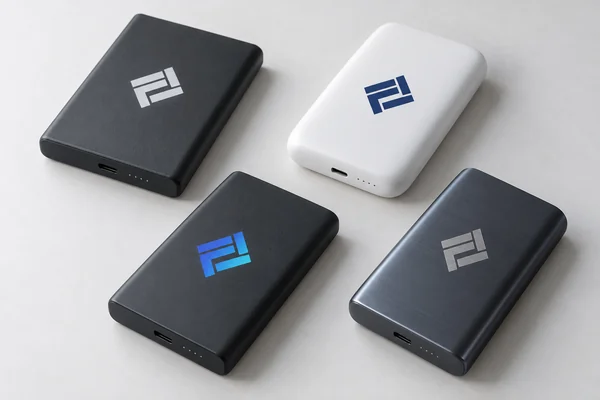
Screen printing: a useful option for a simple brand mark
A one-color wordmark is a sensible screen-printing candidate when the housing provides a suitable print area. Ask the supplier to quote the actual number of colors and print locations. A second side is another operation, even if the artwork is identical.
Do not assume that the same ink works on bare plastic, painted plastic and a soft-touch coating. The surface that receives the ink matters. Marabu’s screen-printing ink technical guidance, for example, distinguishes suitable substrates and calls for preliminary testing.
Separately printed labels and decorative films need their own process review. Winshol’s screen printing equipment overview distinguishes roll-fed and sheet-fed configurations for labels and films. These are different applications from printing directly onto a finished power-bank housing; confirm the material format and how the decoration will be applied.
Pad printing: consider it when the surface is curved
Pad printing transfers an image using a flexible silicone pad. That flexibility makes the process useful for shapes that are harder to reach with a flat print setup. Inkcups describes its printing pads as suitable for flat, curved and irregular surfaces.
A logo that looks balanced on a flat drawing may look stretched around a curve. Check the actual lettering, especially small registered-trademark symbols and thin gaps between letters. Request the supplier’s achievable detail and placement limits rather than assigning a universal minimum line width.
UV digital printing: useful for color, but qualify the surface
UV digital printing is worth discussing for gradients, detailed illustrations or several colors in one design. On dark or transparent housings, a white underbase may be needed to achieve the intended appearance. Confirm where that layer will print and whether it changes the look of transparent areas.
UV curing does not make every print equally durable. Mimaki’s ink-adhesion guidance explains that surface type and pretreatment affect adhesion. A primer or surface treatment may be necessary; the factory should qualify the process on the final finish.
Ask whether the quotation is for direct-to-object printing or an applied transfer or decal. Those are different constructions, with different edges, thickness and wear behavior.
Laser marking: approve the contrast, not a digital color swatch
Laser marking can suit a restrained logo on an appropriate metal housing. Its appearance depends on the alloy, coating and laser process. It should not be quoted as an exact substitute for a Pantone-colored ink logo. Trotec’s anodized-aluminum guidance illustrates how the surface affects the resulting contrast.
If you shortlist YULIDA’s AJ40 aluminum-alloy magnetic power bank, request its current finish specification and a model-specific decoration proposal. An aluminum housing alone does not confirm that every printing or laser process is available.
Artwork checklist: what to send before sampling
Give the supplier a production file and a readable approval PDF. A screenshot from a brand presentation is useful as a reference, but it should not be the only manufacturing input.
| Item | What to specify | What it prevents |
|---|---|---|
| Product identification | Exact model, capacity variant, housing color and finish revision | Approving artwork on the wrong shell |
| Logo master | Supplier-approved vector format, such as AI, EPS or a vector PDF; separate linked assets where needed | Pixelated edges and missing artwork |
| Fonts | Outlined text in the production copy, with an editable master retained by the brand | Font substitution |
| Finished dimensions | Logo width and height in millimeters; label any inch equivalents clearly | Scaling errors |
| Placement | Named face, orientation and offsets from defined housing edges or datums | Ambiguous instructions such as “centered” |
| Print boundary | Supplier-confirmed printable area and keep-out zones | Printing across seams, controls or functional surfaces |
| Color reference | Full Pantone reference where relevant, or agreed process-color file settings; identify the physical approval reference | Assuming a screen preview is the color standard |
| White ink and clear layers | Separate, clearly named layers where required; confirm with the printer | Unwanted white backgrounds, halos or gloss |
| Fine details | Smallest text, line weight and reversed gaps for supplier review | Lost lettering and filled-in details |
| Other graphics | Separate files for the rating label, retail box, manual, barcode and any QR code | Mixing branding with mandatory information |
| Approval control | Artwork revision, approval date, approver and matching sample identifier | Production from an obsolete file |
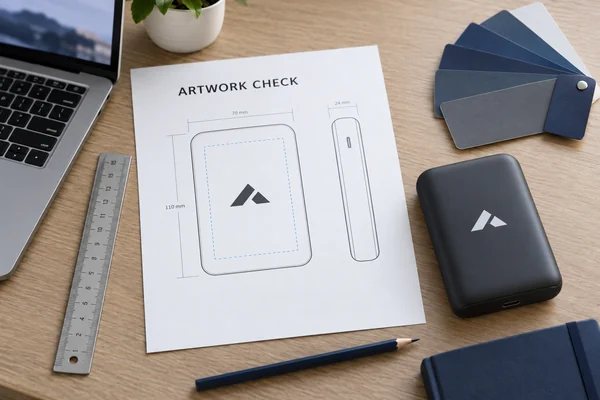
Check the artwork itself, not just its extension
A PDF can contain a low-resolution image. Saving a PNG inside a PDF does not turn it into vector artwork. Adobe’s vector-file guide explains why scalable vector artwork is useful for logos.
If raster artwork is necessary, agree on effective resolution at the final print size. As an illustration, a 30 mm-wide image needs about 355 pixels across to provide 300 pixels per inch at that size. This is a calculation example, not a universal power-bank printing requirement. Changing the resolution label without adding real detail will not repair a blurry file.
Print the approval layout at 100% scale before signing it. A slogan that looks clear on a large monitor may be unreadable on a pocket-sized product.
Specify how brand color will be approved
A Pantone reference identifies the intended color, but it does not guarantee an identical result on every substrate. A process-color simulation and a separately mixed spot ink are different approaches. Adobe’s process-color guidance explains the distinction and why colors can shift between screen and print.
Tell the printer which color file settings to use rather than converting everything to CMYK automatically. Then approve the result on the actual housing. For color-critical orders, agree on viewing conditions and, if instrumental measurement is required, the measurement method and acceptance tolerance. A smartphone photograph should not be the final color reference.
A worked example: one logo, two production choices
Consider a hypothetical US software company ordering matte-black power banks for an event. Its logo includes a blue gradient and a small tagline. The supplier confirms a 30 × 20 mm printable area on the chosen shell. These are illustrative dimensions, not specifications for a YULIDA model.
The buyer has two reasonable options:
- Keep the gradient and request a UV-printed sample with the proposed white underbase.
- Use the brand’s approved one-color logo and request a screen-printed sample.
For either option, the approval drawing might specify a 24 mm-wide logo, an offset measured from a named edge and an agreed placement tolerance. The supplier must confirm that tolerance is achievable. If the tagline fails at the finished size, remove it using an approved logo variant rather than allowing the factory to redesign it.
Compare samples on the same housing finish. Choosing between prints on different shell colors or coatings makes it harder to tell whether the process or the substrate caused the difference.
How to approve the decorated sample
Separate artwork approval from production release. A digital proof approves the file and layout; a physical sample approves how the agreed process looks and behaves on the product. Full product acceptance still needs its own specification and testing.
Before releasing the order:
- Measure logo size, position and orientation against the drawing.
- Compare color, opacity, edges and any white underbase with the approved reference.
- Check adhesion and wear using agreed, surface-appropriate methods. Record conditioning time, test equipment or materials, and pass/fail criteria.
- Confirm that ports, buttons, displays, cable mechanisms and product markings remain unobstructed.
- For magnetic wireless models, obtain an engineering review of decoration on the phone-contact face, especially thick transfers, raised finishes or metallic elements.
- Retain an identified approval sample and matching artwork revision with both buyer and factory.
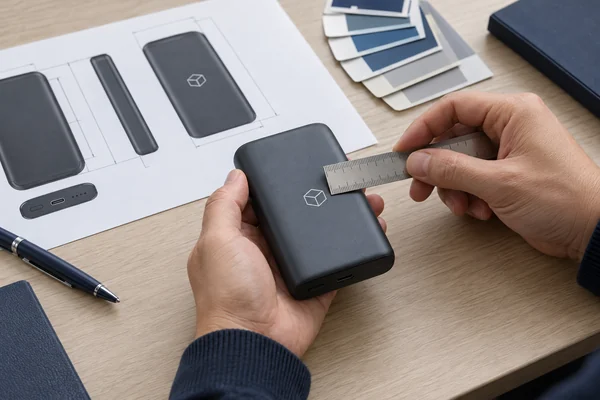
Do not improvise solvent, heat or destructive tests on an assembled lithium-battery product. Have the factory or a qualified laboratory select an appropriate test procedure.
During production, inspect the first decorated pieces and check output under the agreed sampling plan. Treat changes to the ink, primer, coating, artwork or decoration process as controlled changes that may require another approval.
US artwork review: protect labels and verify logo rights
Reserve space for the approved product identification, electrical ratings, warnings and traceability information. Final requirements depend on the model, authorization route and sales channel. Use a separate power-bank label review alongside the branding proof; this article is not a universal US labeling template.
Confirm permission to reproduce customer, event-partner and licensed logos. Do not add a registered-trademark symbol simply because a logo looks finished. The USPTO’s trademark guidance limits use of the federal registration symbol to the goods or services covered by the registration.
Certification logos need a separate authorization check. A test report does not, by itself, authorize a UL Mark; UL’s Marks and Label Hub guide describes its design-review and authorization controls.
For Qi-certified wireless products, check the rebranding route before printing the Qi logo. The Wireless Power Consortium allows certain technically identical rebranded variants without retesting, but requires variant registration and a separate Qi-ID. Changes to housing shape or charging-surface material can require retesting.
A US brand logo also does not change the product’s manufacturing origin. The FTC’s Made in USA guidance distinguishes ordinary American branding from US-origin claims and explains the separate role of imported-product origin marking. Have the importer or compliance reviewer check origin wording and placement, especially if the design uses a US flag, US place name or “Made in USA” claim.
What to include in a custom-logo quotation
Request a quote for a defined job: exact SKU, shell finish, order quantity, quantity per artwork version, print method, colors and locations. Ask whether setup, fixtures, white ink, primers, sample revisions and packaging are included. A total order of 1,000 units split across four designs is not necessarily priced like 1,000 units of one design.
For a separately sourced printed label or film, ask the converter to define the substrate, artwork, ink and drying requirements. Winshol’s screen printing machine RFQ checklist is a useful equipment-side reference for that discussion. Keep the label-production brief separate from the finished power-bank quotation, and approve the decoration on the intended housing.
Work backward from the required US arrival date. Artwork preparation, sampling, approval, production and lithium-battery transport are separate schedule items. A production lead time should not be treated as a delivered-to-event promise.
A useful RFQ instruction is:
Please quote the selected power-bank model with our attached logo at the dimensions and position shown in artwork revision B. Confirm the proposed decoration method, housing finish, printable area, color-approval process and sample charges. List quantities and setup costs separately for each artwork version. Do not substitute the ink, finish or process after sample approval without written agreement.
Frequently asked questions
1. Can I send a PNG logo?
Some digital-print workflows accept a sufficiently detailed PNG, but a vector master is preferable for many logo applications. Confirm final dimensions, effective resolution and transparency handling. A transparent file does not automatically define the white-ink layer.
2. Which method lasts longest?
There is no reliable universal ranking. A properly qualified laser mark on a suitable metal finish can avoid ink-adhesion problems, while printed-logo durability depends on the substrate, ink, pretreatment and curing. Compare results under the agreed wear checks.
3. Can a full-color logo be laser engraved?
Conventional laser branding produces a material-dependent mark, not a full-color reproduction of the artwork. If the brand requires specific printed colors or a gradient, discuss an appropriate ink-printing process instead.
4. What is the minimum order quantity?
It depends on the selected model, decoration and packaging. YULIDA’s OEM/ODM service page lists starting quantities from 500 pieces for applicable existing-model OEM programs. That is not a blanket MOQ for every printing method or customization level; confirm the specific scope in the quotation.
5. Should I approve a physical sample before bulk production?
Yes. Approve a decorated sample on the intended production housing and finish. A digital proof can confirm layout, but it cannot establish ink adhesion, final color or wear resistance. Check the sample against the dimensioned artwork and agreed acceptance criteria, then retain an identified approval sample and its matching artwork revision. If the housing finish or decoration process changes, review whether a new sample is needed before production continues.
6. Can I use the same logo file for the power bank and its packaging?
Use the same approved logo master, but prepare separate production files for each item. The housing, label and box can have different printable areas, substrates and color workflows. Confirm dimensions and placement on each supplier’s template, and approve physical samples on the actual materials. Do not assume that a logo approved on the power-bank shell will reproduce identically on coated paper or film.
Prepare a model-specific artwork review with YULIDA
For a YULIDA project, send the target model, logo master, brand-color reference, order quantity and required US arrival date. Include a dimensioned layout if you have one, or request the model’s current printable-area drawing first.
Request an OEM artwork and quotation review to confirm the available decoration process, sampling scope and document requirements for that configuration. Approve the actual decorated sample before authorizing bulk production.
Official sources and verification
These primary sources support standards, compatibility, safety, or transport statements discussed in this article. Confirm the current requirement for the exact product model and destination market.
- UL Solutions — Battery safety standards and technical safety information.
- Wireless Power Consortium — Qi and Qi2 standards, certification, and wireless-charging information.
