






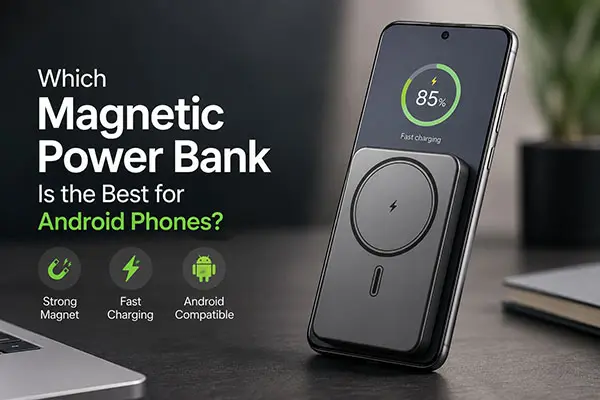
Which Magnetic Power Bank Is the Best for Android Phones?
The best magnetic power bank for an Android phone is one that matches that exact phone’s wireless charging standard, case and power requirements. A magnetic attachment alone does not establish Qi2 support or guarantee a particular charging speed. Start with the phone’s specifications, then compare the power bank’s verified compatibility, capacity, USB-C output, size and weight.
For wholesale and OEM/ODM orders, approve a sample with the intended phones and cases before making performance claims or placing a production order. This guide compares compatibility requirements rather than ranking products from an unverified test.
Key takeaways
- Check wireless charging support on the exact phone model; a magnetic case cannot add a wireless charging receiver.
- Match the phone, case and charger. “MagSafe compatible” alone does not establish an Android charging rate or prove Qi2 certification.
- 25W is about 67% more rated power than 15W. It does not mean 67% less charging time or a guaranteed 67% increase in charging speed.
- Capacity, heat, battery level and simultaneous outputs affect results. Verify the approved product configuration and test conditions.
For the basics, read what a magnetic wireless power bank is.
Android phone, case and charger compatibility
| Phone or setup | Manufacturer-supported detail | What to check before choosing a power bank |
|---|---|---|
| Pixel 10, Pixel 10 Pro, Pixel 10 Pro Fold | Pixelsnap/Qi2 wireless charging up to 15W | Use a compatible magnetic charger and a Qi2-compatible case if a case is fitted; verify the power bank’s stated phone support. |
| Pixel 10 Pro XL | Pixelsnap/Qi2 wireless charging up to 25W | A 25W claim requires a compatible 25W charging combination; a 15W charger does not provide 25W. |
| Samsung Galaxy S25 with OtterBox React Series Case with Magnets | Samsung lists up to 15W with Qi2 wireless chargers for this case | Check the case is for the exact phone and the power bank supports the required charging profile. |
| Other Android models | Support differs by exact model and charger | Confirm wireless charging hardware, permitted cases and charger compatibility in the phone manufacturer’s documentation; do not infer support from the brand or a magnetic ring. |
These are compatibility examples, not measured YULIDA power-bank results. Sources: Google Pixel specifications, Google Pixelsnap setup and compatibility, and Samsung Galaxy S25 magnetic case specifications.
Google’s recommendation of a 35W-or-higher USB-C adapter for 25W charging applies to its externally powered Pixelsnap Charger. It is not a universal wall-adapter requirement for a battery-powered magnetic power bank.
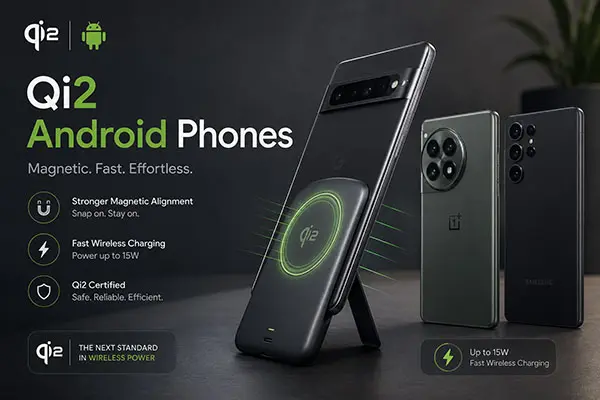
Do Magnetic Power Banks Actually Work on Android Phones?
Yes, when the phone and power bank support a compatible wireless charging mode. Magnetic attachment and power transfer are separate requirements. Check both rather than assuming every Android phone will work.
Phones with built-in magnetic charging support
For a phone with integrated magnetic alignment, choose a charger supported by the manufacturer and check the case requirements. A thick or unsuitable case can weaken attachment or interfere with charging.
Phones that require a magnetic case
Samsung’s guidance for its Qi2 car charger specifies a suitable Qi2 Ready magnetic case for the Galaxy S25 series, Z Fold7 and Z Flip7. The case must match the phone. This does not establish Qi2 support for every older Galaxy model or for every accessory advertised as magnetic.
Other Qi phones and phones without wireless charging
Some phones support Qi charging but lack magnetic attachment. Only use cases or alignment accessories that the phone and charger manufacturers support. A stick-on ring does not upgrade charging electronics, establish Qi2 certification or add wireless charging to a phone without the necessary receiver. For broad compatibility, check the power bank’s USB-C charging option as well.
Qi, Qi2, Qi2 25W and MagSafe: what the labels tell you
Qi is the Wireless Power Consortium’s wireless-charging standard. Qi2 introduced a magnetic alignment system with 15W charging; Qi v2.2.1 is branded Qi2 25W. The phone and charger still need to support the intended mode. Check the exact product through the WPC’s standards and certified-product guidance rather than treating a logo or a supplier’s wording as sufficient evidence.
“MagSafe compatible” alone does not tell you an Android charging rate. Check whether the specific charger also supports Qi or Qi2 and whether the phone manufacturer lists it as compatible. Do not apply a blanket 5W, 7.5W or 15W limit to every product using that label.
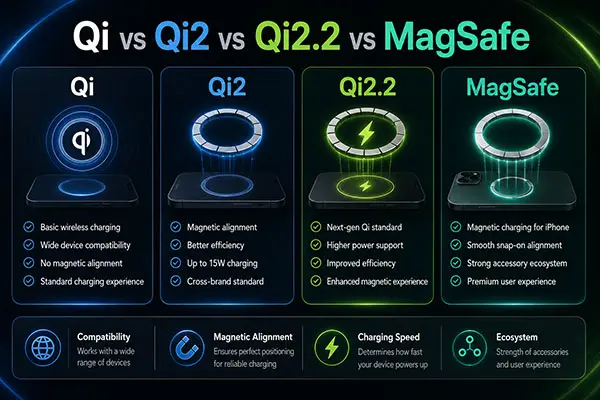
Illustrative overview. Check the specific standard version and certified product configuration; this image does not establish a charging rate for every phone.
Why 25W does not establish a charging-time advantage
The difference between 15W and 25W is a rated-power comparison: 25 ÷ 15 is about 1.67. Actual charging time depends on the power delivered over the entire session, battery capacity, temperature, state of charge and phone use. A “67% faster” claim needs a defined, repeatable comparison test; the wattage ratio alone does not support it.
How to Choose: 6 Key Factors for Android Users
1. Verify the exact phone and case
Check the phone model and its manufacturer’s wireless charging requirements. Then check the case, camera clearance and charging-surface fit. A power bank that attaches physically may still charge poorly or fail to negotiate the intended power.
2. Match supported charging power
Read the wireless output specification separately from USB-C output. A “25W” or “45W” headline may refer to a wired port or combined output. Request the wireless protocol, supported phone list and operating conditions for the exact model. Do not assume the phone will always receive the power bank’s maximum rating.
3. Compare capacity using energy and test results
Use watt-hours when comparing stored energy: Wh = mAh × nominal voltage ÷ 1,000. For example, 10,000mAh at 3.7V is 37Wh. The number of phone charges also depends on conversion losses, the phone battery and usage during charging. A fixed “65% efficiency” or full-charge count should not be claimed without a defined test. Compare published weight and dimensions alongside capacity.
4. Check USB-C PD, PPS and cable requirements
Wired charging is a useful fallback when wireless compatibility or speed is limited. Match the phone’s USB Power Delivery and PPS requirements to the power bank’s actual voltage/current profiles. Check the cable rating and any shared-output limits. Do not require a 5A cable for every Galaxy S25 charging setup: Samsung documents supported SFC 2.0 combinations using the included 3A cable on S25 and later models. Follow the guidance for the exact phone and charger.
5. Check alignment and heat under realistic conditions
Approve a sample with representative phones and cases. Record attachment stability, charging interruptions, temperature and delivered energy over a defined charge interval. Warmth alone does not prove coil misalignment. If charging becomes unusually hot or unreliable, stop and follow the manufacturer’s troubleshooting instructions. Do not promise that certification prevents every overheating or battery problem.
6. Verify useful extra features
A stand, display, built-in cable or additional output may be useful, but confirm each feature on the selected model. Ask whether simultaneous wired and wireless charging reduces output, whether pass-through operation is supported, and what the display actually indicates. Avoid treating a percentage display as proof of measurement accuracy.
Choosing a magnetic power bank by Android brand
Samsung Galaxy
Start with the exact Galaxy model and a supported case/charger combination. For S25 magnetic charging, use the appropriate magnetic case rather than assuming the phone has built-in magnets. Samsung warns that mismatched magnetic covers and non-MPP chargers can cause slow or interrupted charging. Check USB-C PD/PPS support separately if wired charging is part of the purchase requirement.
Google Pixel
The Pixel 10 models in the table have different maximum wireless power ratings. Match those ratings to the selected power bank and use a compatible case. Do not assume every earlier Pixel works with the same magnetic charger: Google specifically cautions against using its Pixelsnap Charger with previous Pixel generations.
OnePlus and other Android phones
A manufacturer’s proprietary wireless fast-charging figure is not a promised output from a generic Qi power bank. OnePlus lists 50W AIRVOOC for OnePlus 13 and offers matching magnetic accessories. That does not establish 50W output or Qi2 certification for a third-party power bank. For Xiaomi, Motorola and other brands, check the specific model and accessory documentation before choosing a product.
Choosing capacity for commuting, daily use and travel
Compact top-ups
Compare 5,000mAh models when size and weight matter most. Check the actual dimensions and usable energy rather than assuming every model provides a fixed percentage of a phone charge.
Longer daily use
Compare 10,000mAh models when additional stored energy is worth the extra bulk. Check wireless and USB-C performance separately, particularly if the phone will be used while charging.
Travel and multiple devices
Higher-capacity models can offer more stored energy, but weight, charging time and airline rules matter. Read the product’s Wh label; mAh alone is not enough. Under FAA guidance, power banks are spare lithium batteries and belong in carry-on baggage, with terminals protected. Check the current airline and route requirements before travelling; a capacity figure is not a universal “airline-approved” certification.
OEM/ODM sourcing next step
Compare YULIDA’s magnetic wireless power bank models and review the OEM/ODM service scope. Send the intended phone models, cases, capacity, wireless and USB-C requirements, quantity and destination market with your enquiry. Request the current specification, sample test plan and model-specific certification evidence before approving branding or production.
Common mistakes when buying a magnetic power bank for Android
- Confusing magnetic attachment with compatible wireless charging.
- Reading total or USB-C wattage as wireless output.
- Treating a case, ring or “MagSafe compatible” label as proof of Qi2 certification.
- Promising a full-charge count from mAh alone.
- Assuming peak power is sustained throughout a charge.
- Approving an OEM model without testing the intended phones, cases and simultaneous-output modes.
See the magnetic wireless power bank explainer for the underlying technology.
Magnetic power bank FAQ for Android users
Do magnetic power banks work on every Android phone?
No. The phone must support a compatible wireless charging mode. A magnetic case or ring does not add the receiver hardware. Use a suitable cable when wireless charging is unsupported.
Which Android phones support Qi2 magnetic charging?
Support is model-specific. The manufacturer-backed examples in the table include Pixel 10 models and a Galaxy S25 setup using an appropriate magnetic case. Check the current phone and accessory documentation; do not infer support across an entire brand or generation.
Can I use a MagSafe-compatible power bank on Android?
Possibly. Verify the exact power bank’s Qi/Qi2 support, the phone’s requirements and the case. The label alone does not establish compatibility or a fixed charging rate.
Do I need a magnetic case for Samsung Galaxy?
For the Galaxy S25 setups described here, a suitable magnetic case provides attachment and alignment. Choose one designed for the exact phone and charging system. Do not assume all magnetic cases produce the same result.
What is the difference between Qi2 and MagSafe?
Qi2 is a WPC wireless-charging standard with magnetic alignment; MagSafe is Apple’s branded accessory and charging system. Some products support both. Read the exact certification and compatibility information rather than treating the names as mutually exclusive speed limits.
How fast can a magnetic power bank charge Android?
It depends on the compatible charging mode, battery level, temperature and use during charging. Maximum rated watts do not establish a full-charge time. Request measured results with the phone, case and test conditions identified.
Are magnetic power banks allowed on airplanes?
Check the airline and route rules. FAA guidance requires power banks in carry-on baggage and protected against short circuits; the battery’s Wh rating affects the applicable limits. Damaged or recalled batteries require separate attention. Check the current FAA PackSafe guidance before travel.
Can a magnetic power bank overheat or affect battery health?
Wireless charging can generate heat. Use compatible, properly documented equipment and follow the phone and power bank manufacturers’ instructions. Stop using a product that becomes unusually hot, swollen or damaged. Certification is useful evidence, but it is not a guarantee against every fault or misuse.
Conclusion: choose the combination, then verify the model
Choose the power bank around the actual phone, case and charging requirements. Compare capacity, USB-C fallback, fit and weight, then verify performance on a sample. For a branded or wholesale programme, agree the specification and evidence for the exact configuration before approving production.
Official sources and verification
These primary sources support standards, compatibility, safety, or transport statements discussed in this article. Confirm the current requirement for the exact product model and destination market.
- Google Pixel Help — Device charging features and compatibility guidance.
- Google Pixel Help — Device charging features and compatibility guidance.
- Samsung Support — Device charging features and compatibility guidance.
- Samsung Support — Device charging features and compatibility guidance.
- Wireless Power Consortium — Qi and Qi2 standards, certification, and wireless-charging information.
- Samsung Support — Device charging features and compatibility guidance.
